Your Windows & WSL2 agents, in your pocket.

Keep Claude Code, Codex, and ACP coding agents running on your Windows 11 workstation or inside WSL2. Follow diffs live, approve bash and MCP tool calls from your iPhone Lock Screen or Apple Watch, preview localhost dev ports, and open your 1080p60 Windows desktop over end-to-end encryption.

MIT open-source host & gateway · E2E XChaCha20-Poly1305 · Works over cellular with zero open router ports

Claudewsl2 · api-gateway
Run integration suite inside WSL2 Ubuntu before opening PR

Waiting on Windows workstation

pnpm --filter @app/server test:integration

Executing in WSL2 Ubuntu… ✓ 68 passed in 4.1s. Claude continues on your PC. Denied. Claude stays in read-only inspection.

Interactive preview — tap Allow to test how Windows/WSL2 approvals feel on your phone.

Two ways to run on a Windows PC

Most Windows developers split work between Linux containers in WSL2 and native Windows GUI tools. LinkShell supports both — pick one or run both under the same account.

Option A · Recommended for Linux Repos

WSL2 Host + Terminal Handoff

Install linkshell-cli inside Ubuntu or Debian on WSL2 (Node.js 22.13+). You get the exact Unix-socket experience as macOS and Linux:

  • Seamless handoff: Run linkshell claude or linkshell codex in Windows Terminal. Walk away and steer from your phone; press any key at your desk to take back control.
  • Full Linux tooling: node-pty bash terminals, isolated git worktrees per session, and localhost dev-server previews tunnelled to your phone.
# Inside WSL2 (Node.js 22.13+)
$ npm i -g linkshell-cli
$ linkshell login
$ linkshell host --daemon
$ linkshell claude
Option B · Desktop + DXGI Screen Control

Native Windows 10/11 x64 Desktop Preview

Install LinkShell-Setup-*-windows-x64.exe (or unpack the portable ZIP) on Windows 10 1809+ or Windows 11 x64 — bundles Node.js, CLI, Host, Electron workspace, and LGPL FFmpeg:

  • Hardware H.264 desktop stream: DXGI Desktop Duplication + NVENC / AMF / QSV WebRTC video up to 1080p60, with direct touch/mouse/keyboard control via SendInput on an unlocked desktop.
  • PowerShell ConPTY & Codex discovery: Named-pipe RPC, native PowerShell terminals, and automatic detection of %LOCALAPPDATA%\OpenAI\Codex\bin\codex.exe.
# Or install via npm in PowerShell (Node 22.13+)
> npm i -g linkshell-cli
> linkshell setup
> linkshell status

LinkShell vs Mobile SSH, RDP & VS Code Tunnels

Pinching and zooming a 160-column terminal or a 4K Windows desktop on a 6-inch phone screen makes reviewing diffs miserable. LinkShell renders agent turns natively and reserves remote desktop for checking the final UI.

Comparing remote control workflows for Claude Code and Codex on Windows & WSL2
Workflow need LinkShell (WSL2 + Win) SSH + Tailscale (Termius) RDP / RustDesk / Parsec VS Code Remote Tunnel
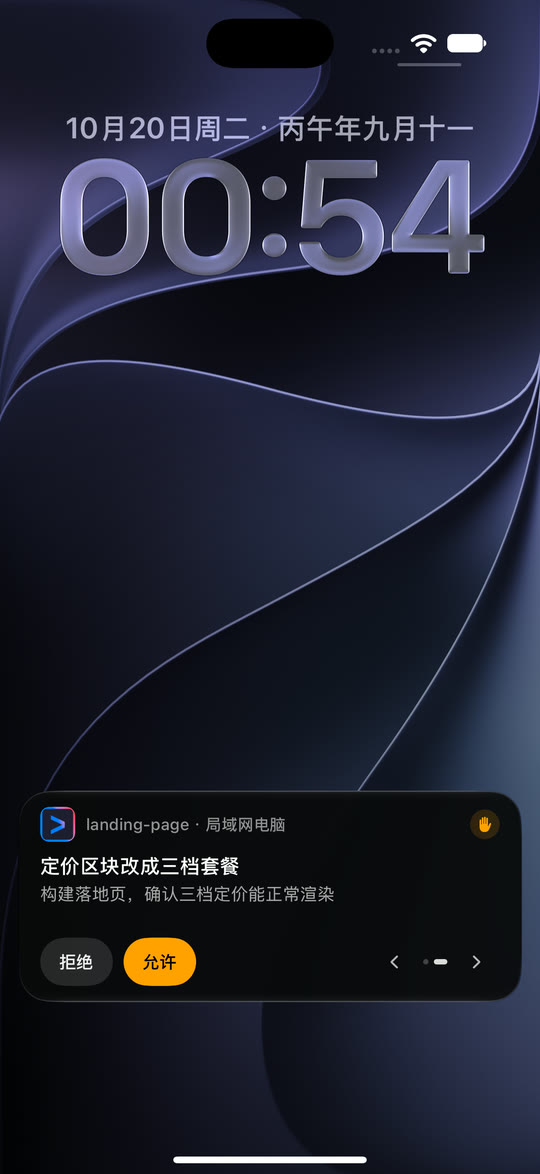
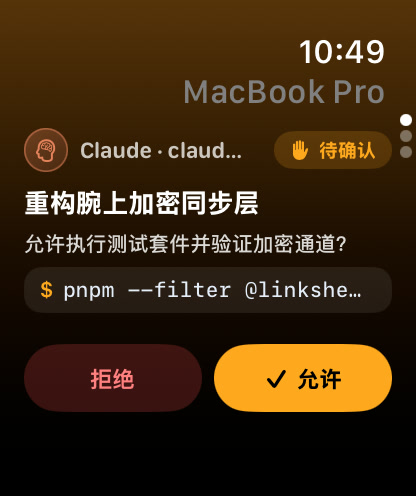
Approve tool calls from Lock Screen & Watch Native iOS Live Activity & Apple Watch — 1-tap Allow / Deny without unlocking phone No push cards; must open SSH, attach tmux, type keystrokes No push alerts; must stream full desktop and click tiny prompt No Lock-Screen or Watch approval integration
Mobile readability of diffs & sub-agents Structured mobile UI — per-file diffs, plans, sub-agent trees, and mid-turn message queue Raw ANSI terminal wrapping on narrow screen Desktop pixels scaled down; constant horizontal panning Browser editor UI not optimized for one-handed phone triage
Terminal handoff at your PC linkshell claude / codex in WSL2 — switch freely between PC keyboard and phone Requires manual tmux / zellij discipline Shares desktop window only Separate web session from local CLI
1080p60 Windows GUI & browser check Built in — DXGI H.264 WebRTC desktop + tunnelled localhost port previews Text only; cannot inspect Windows GUI or rendered layout Good video, but zero structured agent timeline Port forwarding only; no Windows desktop capture
Firewall & NAT setup Zero open ports — E2E XChaCha20-Poly1305 via official or self-hosted Docker gateway Requires VPN mesh + WSL2 port/sshd service upkeep Requires VPN or third-party relay setup GitHub/Microsoft cloud relay
iPhone Lock Screen Live Activity showing a pending LinkShell agent permission request with Deny and Allow buttons
Apple Watch showing a pending LinkShell permission request with Deny and Allow buttons

Free with Docker, or $26.49/yr for the whole iTool suite

Self-Hosted Gateway (MIT)

$0

Every feature unlocked with your own relay

  • Run nickname4th/linkshell-gateway on any VPS
  • Pair Windows & WSL2 machines via QR code
  • End-to-end encrypted; gateway sees only ciphertext
Self-hosting docs

iTool Yearly Membership

$26.49/yr

¥99/yr via Alipay · or $3.19/mo (¥9.9/mo) monthly

  • Official global gateway + TURN relay included — zero server maintenance
  • Sign in once on WSL2, Windows, Mac & phone — machines appear automatically
  • Yearly plan unlocks all 7 iTool apps (LinkShell, Saylane, Transeen, StupidMirror, CoShot & more)
Get iTool Yearly ($26.49/yr) ↗

Questions about Windows & WSL2

Should I install LinkShell inside WSL2 or native Windows?

You can run either — or both on the same PC. Install linkshell-cli inside WSL2 (Ubuntu/Debian with Node.js 22.13+) when your repositories live in Linux and you want Unix-socket terminal handoff (linkshell claude, linkshell codex), bash PTYs, and localhost port previews. Install LinkShell.exe on Windows 10/11 x64 when you also want hardware H.264 remote desktop viewing (DXGI up to 1080p60), PowerShell ConPTY, and native Windows Codex sessions.

Do I need port forwarding, Tailscale, or a static IP on my Windows PC?

No. Both the WSL2 daemon and the Windows Host open an outbound WebSocket to the LinkShell gateway and negotiate an end-to-end encrypted XChaCha20-Poly1305 tunnel (with optional WebRTC/TURN direct lanes). Your iPhone, Android phone, or Apple Watch connects over cellular or any Wi-Fi with zero open router ports.

Can LinkShell stream my actual Windows 11 desktop to my iPhone?

Yes. The native Windows x64 package includes LinkShellScreenHelper, which captures the unlocked interactive desktop via DXGI Desktop Duplication, encodes hardware H.264 (NVENC, AMF, or QSV) up to 1080p60 over WebRTC, and dispatches touch/mouse/key input through SendInput (falling back to GDI/JPEG when needed).

Are there any current Windows Desktop Preview caveats?

Two transparent caveats: first, the Windows .exe/.zip builds are currently unsigned, so Windows SmartScreen prompts once ('More info → Run anyway'). Second, CLI TUI handoff over a Unix socket (typing linkshell claude or linkshell codex to hand off a live terminal mid-turn) works inside WSL2; on native Windows without WSL, sessions are started from the phone or desktop workspace.

How much does LinkShell cost for Windows & WSL2?

Every feature is free if you self-host the MIT-licensed gateway (one Docker container). To use the official zero-config gateway, an iTool membership is $3.19/month (¥9.9/mo) or $26.49/year (¥99/yr), and the yearly tier unlocks all 7 iTool apps.

Step away from your Windows rig without stalling the build.

Pair your WSL2 environment or Windows 11 desktop in two minutes, or see how Apple Watch & Lock-Screen approvals work when your phone stays in your bag.